whisper
This example is for the M5Stack Module LLM. It requires the M5Stack Module LLM to be connected to the M5Stack CoreS3, Core2 or Basic.
The example demonstrates how to use the M5ModuleLLM library to perform keyword spotting (KWS), voice activity detection (VAD), and automatic speech recognition (ASR) using the Whisper model.
Before using, make sure you have the latest software packages installed
Tip
Need help getting started? View the tutorial.
apt install llm-whisper llm-kws llm-vad
UIFLOW2 English Example
Before using, make sure you have the latest model packages installed
apt install llm-model-whisper-tiny llm-model-silero-vad llm-model-sherpa-onnx-kws-zipformer-gigaspeech-3.3m-2024-01-01
Tip
For more information about this model see the details.
Click here to jump to English whisper demo
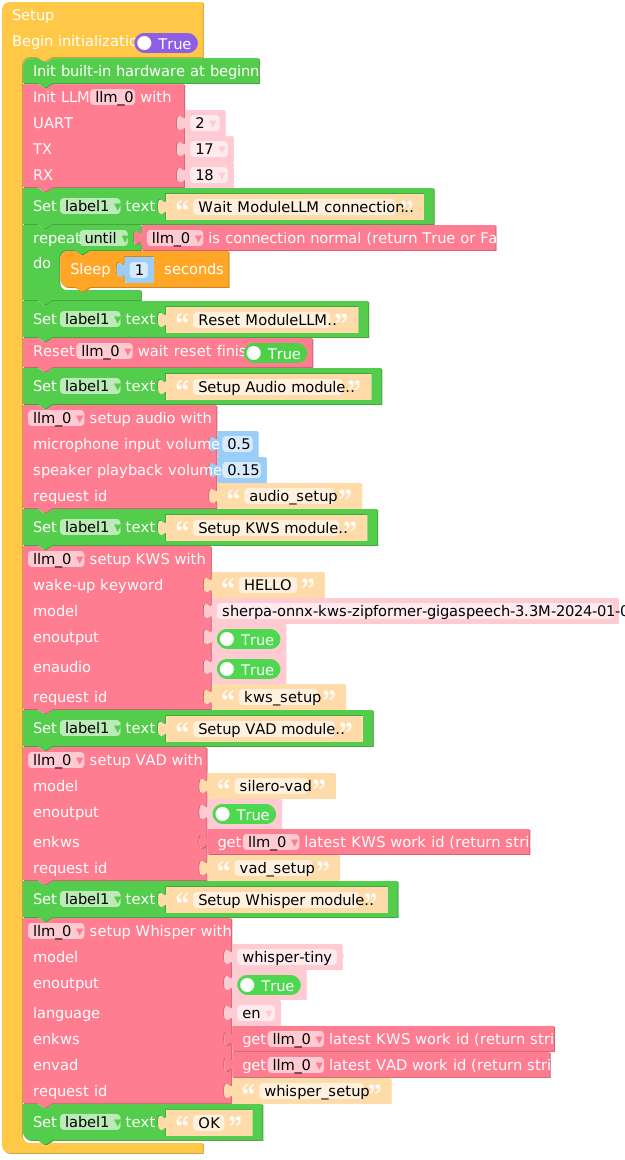
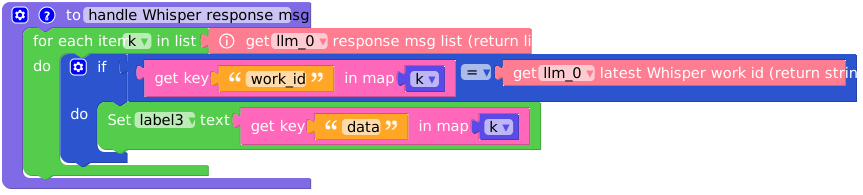
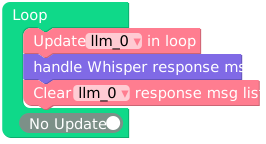
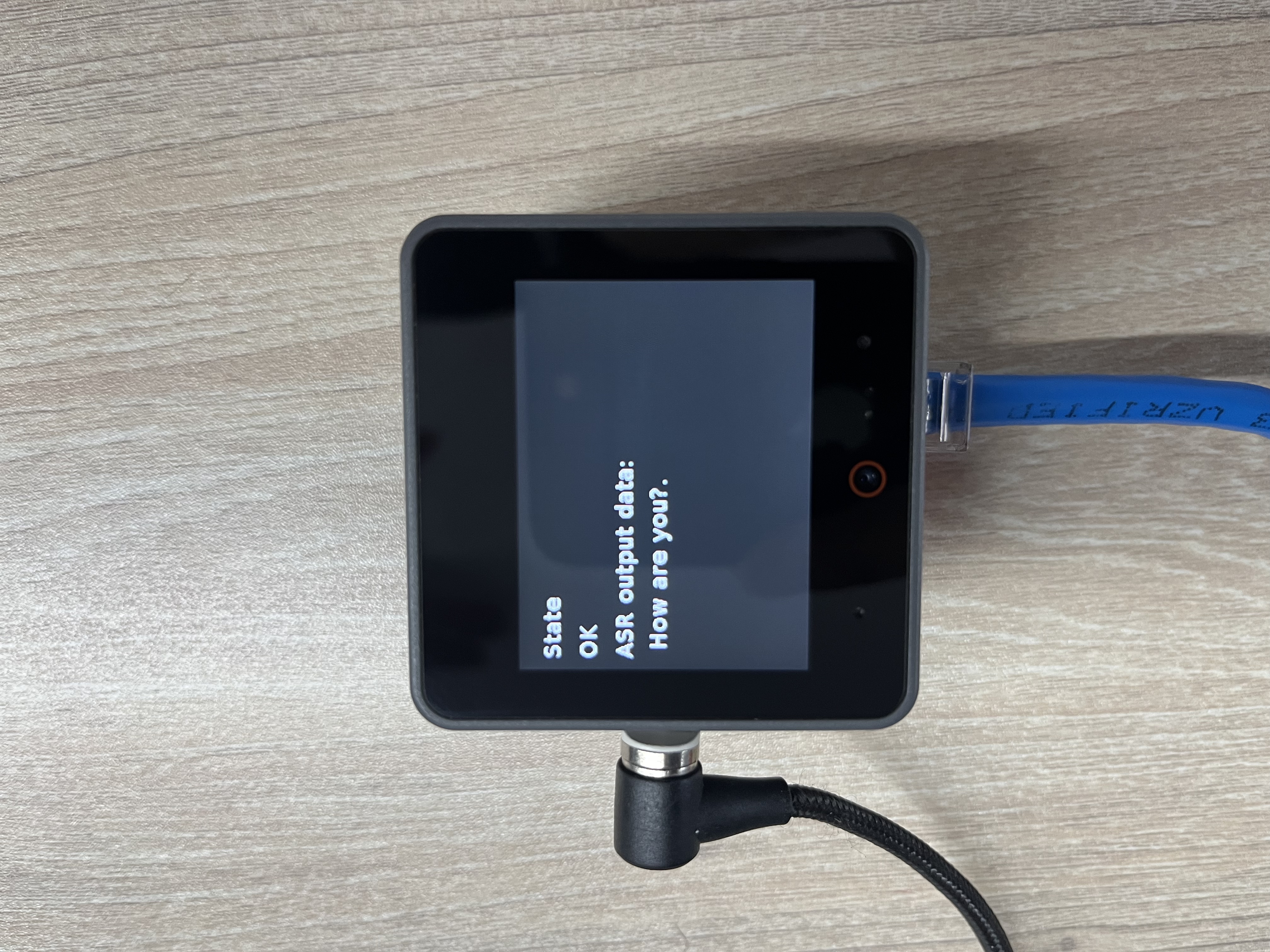
Micropython English Example
Before using, make sure you have the latest model packages installed
apt install llm-model-whisper-tiny llm-model-silero-vad llm-model-sherpa-onnx-kws-zipformer-gigaspeech-3.3m-2024-01-01
Tip
For more information about this model see the details.
import os, sys, io
import M5
from M5 import *
from module import LlmModule
import time


label0 = None
label1 = None
label2 = None
label3 = None
llm_0 = None


k = None

# Describe this function...
def handle_Whisper_response_msg():
    global k, label0, label1, label2, label3, llm_0
    for k in (llm_0.get_response_msg_list()):
        if (k['work_id']) == (llm_0.get_latest_whisper_work_id()):
            label3.setText(str(k['data']))


def setup():
    global label0, label1, label2, label3, llm_0, k

    M5.begin()
    Widgets.fillScreen(0x222222)
    label0 = Widgets.Label("State", 10, 20, 1.0, 0xffffff, 0x222222, Widgets.FONTS.DejaVu18)
    label1 = Widgets.Label("~", 10, 50, 1.0, 0xffffff, 0x222222, Widgets.FONTS.DejaVu18)
    label2 = Widgets.Label("ASR output data:", 10, 80, 1.0, 0xffffff, 0x222222, Widgets.FONTS.DejaVu18)
    label3 = Widgets.Label("~", 10, 108, 1.0, 0xffffff, 0x222222, Widgets.FONTS.DejaVu18)

    llm_0 = LlmModule(2, tx=17, rx=18)
    label1.setText(str('Wait ModuleLLM connection..'))
    while not (llm_0.check_connection()):
        time.sleep(1)
    label1.setText(str('Reset ModuleLLM..'))
    llm_0.sys_reset(True)
    label1.setText(str('Setup Audio module..'))
    llm_0.audio_setup(cap_volume=0.5, play_volume=0.15, request_id='audio_setup')
    label1.setText(str('Setup KWS module..'))
    llm_0.kws_setup(kws='HELLO', model='sherpa-onnx-kws-zipformer-gigaspeech-3.3M-2024-01-01', enoutput=True, enaudio=True, request_id='kws_setup')
    label1.setText(str('Setup VAD module..'))
    llm_0.vad_setup(model='silero-vad', enoutput=True, enkws=llm_0.get_latest_kws_work_id(), request_id='vad_setup')
    label1.setText(str('Setup Whisper module..'))
    llm_0.whisper_setup(model='whisper-tiny', enoutput=True, language='en', enkws=llm_0.get_latest_kws_work_id(), envad=llm_0.get_latest_vad_work_id(), request_id='whisper_setup')
    label1.setText(str('OK'))


def loop():
    global label0, label1, label2, label3, llm_0, k
    llm_0.update()
    handle_Whisper_response_msg()
    llm_0.clear_response_msg_list()


if __name__ == '__main__':
    try:
        setup()
        while True:
            loop()
    except (Exception, KeyboardInterrupt) as e:
        try:
            from utility import print_error_msg
            print_error_msg(e)
        except ImportError:
            print("please update to latest firmware")
UIFLOW2 Japanese Example
Before using, make sure you have the latest model packages installed
apt install llm-model-whisper-tiny llm-model-silero-vad llm-model-sherpa-onnx-kws-zipformer-gigaspeech-3.3m-2024-01-01
Tip
For more information about this model see the details.
Click here to jump to Japanese whisper demo
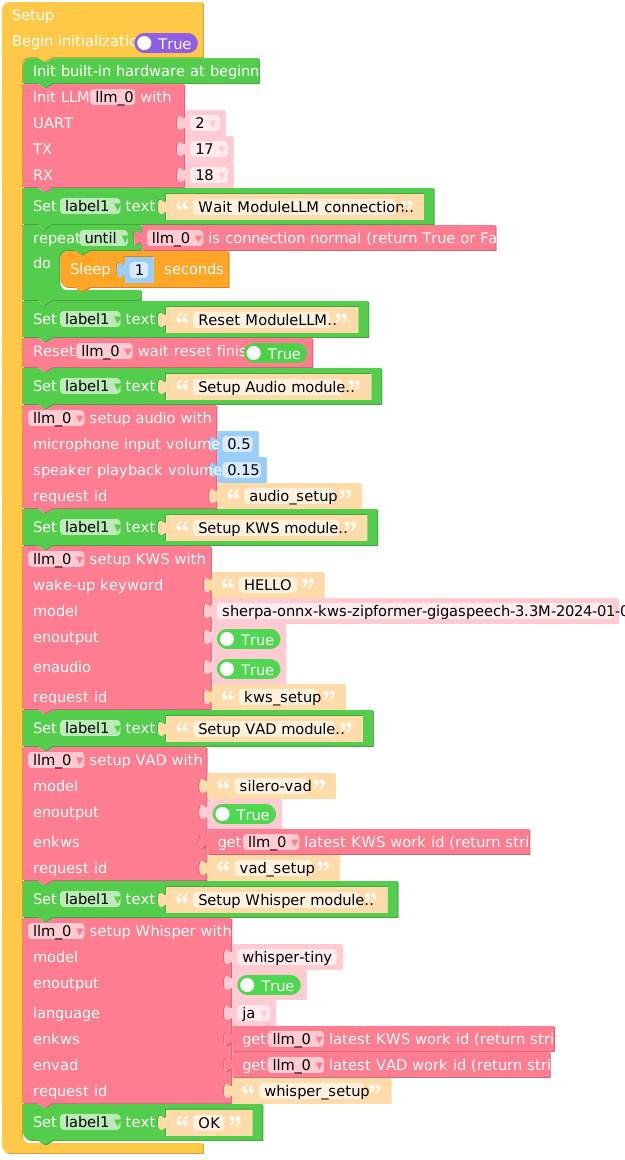
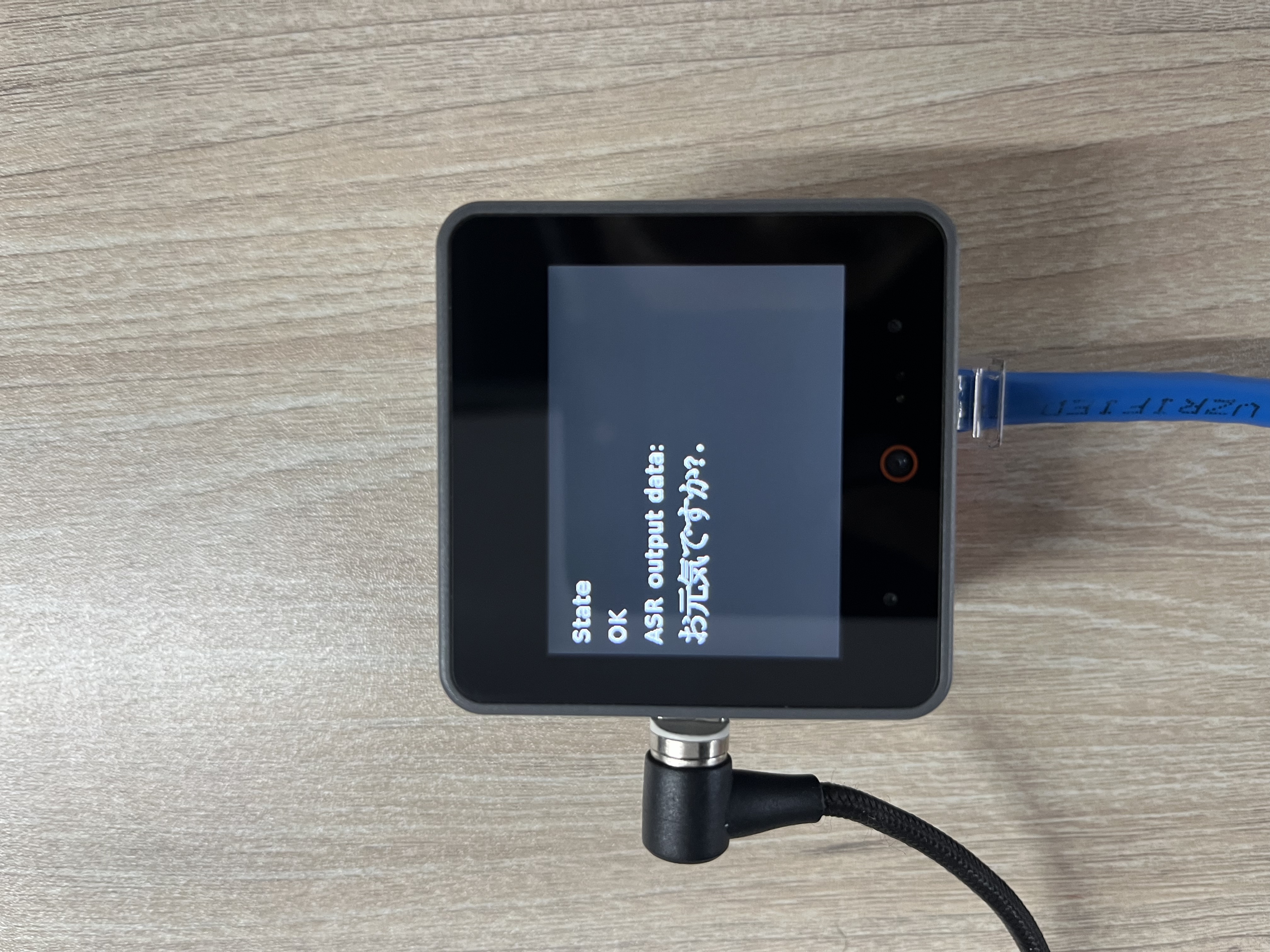
Micropython Japanese Example
Before using, make sure you have the latest model packages installed
apt install llm-model-whisper-tiny llm-model-silero-vad llm-model-sherpa-onnx-kws-zipformer-gigaspeech-3.3m-2024-01-01
Tip
For more information about this model see the details.
import os, sys, io
import M5
from M5 import *
from module import LlmModule
import time


label0 = None
label1 = None
label2 = None
label3 = None
llm_0 = None


k = None

# Describe this function...
def handle_Whisper_response_msg():
    global k, label0, label1, label2, label3, llm_0
    for k in (llm_0.get_response_msg_list()):
        if (k['work_id']) == (llm_0.get_latest_whisper_work_id()):
            label3.setText(str(k['data']))


def setup():
    global label0, label1, label2, label3, llm_0, k

    M5.begin()
    Widgets.fillScreen(0x222222)
    label0 = Widgets.Label("State", 10, 20, 1.0, 0xffffff, 0x222222, Widgets.FONTS.DejaVu18)
    label1 = Widgets.Label("~", 10, 50, 1.0, 0xffffff, 0x222222, Widgets.FONTS.DejaVu18)
    label2 = Widgets.Label("ASR output data:", 10, 80, 1.0, 0xffffff, 0x222222, Widgets.FONTS.DejaVu18)
    label3 = Widgets.Label("~", 10, 108, 1.0, 0xffffff, 0x222222, Widgets.FONTS.EFontJA24)

    llm_0 = LlmModule(2, tx=17, rx=18)
    label1.setText(str('Wait ModuleLLM connection..'))
    while not (llm_0.check_connection()):
        time.sleep(1)
    label1.setText(str('Reset ModuleLLM..'))
    llm_0.sys_reset(True)
    label1.setText(str('Setup Audio module..'))
    llm_0.audio_setup(cap_volume=0.5, play_volume=0.15, request_id='audio_setup')
    label1.setText(str('Setup KWS module..'))
    llm_0.kws_setup(kws='HELLO', model='sherpa-onnx-kws-zipformer-gigaspeech-3.3M-2024-01-01', enoutput=True, enaudio=True, request_id='kws_setup')
    label1.setText(str('Setup VAD module..'))
    llm_0.vad_setup(model='silero-vad', enoutput=True, enkws=llm_0.get_latest_kws_work_id(), request_id='vad_setup')
    label1.setText(str('Setup Whisper module..'))
    llm_0.whisper_setup(model='whisper-tiny', enoutput=True, language='ja', enkws=llm_0.get_latest_kws_work_id(), envad=llm_0.get_latest_vad_work_id(), request_id='whisper_setup')
    label1.setText(str('OK'))


def loop():
    global label0, label1, label2, label3, llm_0, k
    llm_0.update()
    handle_Whisper_response_msg()
    llm_0.clear_response_msg_list()


if __name__ == '__main__':
    try:
        setup()
        while True:
            loop()
    except (Exception, KeyboardInterrupt) as e:
        try:
            from utility import print_error_msg
            print_error_msg(e)
        except ImportError:
            print("please update to latest firmware")