API reference
This section provides a reference for the UiFlow API used in the examples. It includes details on the functions, classes, and methods available for use in your UiFlow projects.
LlmModule
class LlmModule
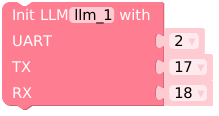
Initialize LlmModule and set up UART communication based on board type.
methods
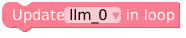
Update ModuleLLM, receive response message.

Check if the module connection is working properly.
return: True if the connection is connected, False otherwise.
type: bool

return: Models installed on ModuleLLM.
type: str

Get the message list of the latest response from ModuleLLM.

return: The latest work ID of the LLM module.
type: str

return: The latest work ID of the MeloTTS module.
type: str

return: The latest work ID of the KWS module.
type: str

return: The latest work ID of the ASR module.
type: str

return: The latest work ID of the camera module.
type: str

return: The latest work ID of the YOLO module.
type: str

return: The latest work ID of the VAD module.
type: str

return: The latest work ID of the Whisper module.
type: str

return: The latest error code of the LLM module.
type: str

Send a ping to the system and get the response code.

Reset the ModuleLLM and clear all work IDs.

Remove the model on ModuleLLM.
Reboot the ModuleLLM.

Clear the response message list.
Keyword Spotting
KWS block
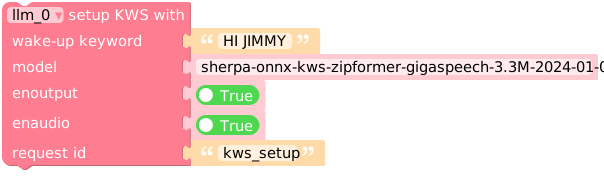
llm_0.kws_setup(kws='HI JIMMY', model='sherpa-onnx-kws-zipformer-gigaspeech-3.3M-2024-01-01', enoutput=True, enaudio=True, request_id='kws_setup')
kws: The wake-up keyword to listen for. Must be capitalized.
model: Default is sherpa-onnx-kws-zipformer-gigaspeech-3.3M-2024-01-01 for English. see the available models: sherpa-onnx-kws-zipformer.
enoutput: Enables output of the keyword spotting results.
enoutput: If true, the KWS module will return the boolean result in the response. Default is true.
enaudio: If true, the KWS module will play the wake-up audio. Default is true.
request_id: The request ID for the setup. You can use any string as the request ID.
Voice activity detection
VAD block
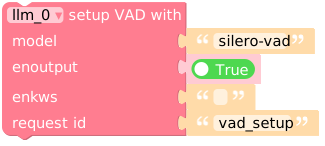
llm_0.vad_setup(model='silero-vad', enoutput=True, enkws='', request_id='vad_setup')
model: The model name for voice activity detection. Default is silero-vad. see the available models: silero-vad.
enoutput: If true, the VAD module will return the boolean result in the response. Default is true.
enkws: The work ID of the latest KWS module. Default is an empty string.
request_id: The request ID for the setup. You can use any string as the request ID.
Automatic Speech Recognition
ASR block
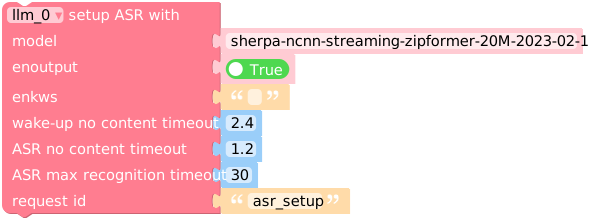
llm_0.asr_setup(model='sherpa-ncnn-streaming-zipformer-20M-2023-02-17', enoutput=True, enkws='', rule1=2.4, rule2=1.2, rule3=30, request_id='asr_setup')
model: The model name for automatic speech recognition. Default is sherpa-ncnn-streaming-zipformer-20M-2023-02-17 for English. see the available models: sherpa-ncnn-streaming-zipformer.
enoutput: If true, the ASR module will return the recognized text in the response. Default is true.
enkws: The work ID of the latest KWS module. Default is an empty string.
rule1: Times out after 2.4 seconds of silence, even if we decoded nothing.
rule2: Times out after 1.2 seconds of silence after decoding something.
rule3: Times out after the utterance is 30 seconds long, regardless of anything else.
request_id: The request ID for the setup. You can use any string as the request ID.
Transcription
Whisper block
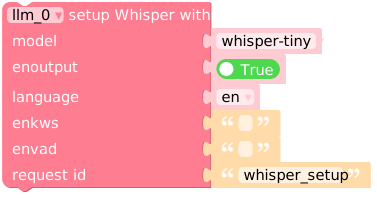
llm_0.whisper_setup(model='whisper-tiny', enoutput=True, language='en', enkws='', envad='', request_id='whisper_setup')
model: The model name. default is whisper-tiny. You can use whisper-base or whisper-small for larger models. see the available models: whisper-tiny | whisper-base | whisper-small
language: The language for the Whisper module. You can use en for English or ja for Japanese.
enkws: The work ID of the latest KWS module. Default is an empty string.
envad: The work ID of the latest VAD module. Default is an empty string.
request_id: The request ID for the setup. You can use any string as the request ID.
Text-to-speech
MeloTTS block
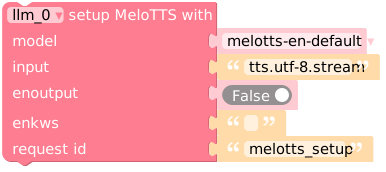
llm_0.melotts_setup(model='melotts-en-default', input='tts.utf-8.stream', enoutput=False, enkws='', request_id='melotts_setup')
model: The model name. You can use melotts-en-default for English or melotts-ja-jp for Japanese. see the available models: English | Japanese | Chinese.
input: The input format for the TTS module. You can use tts.utf-8.stream for UTF-8 encoded text streaming input.
enoutput: If true, the TTS module will return the base64 encoding pcm data in utf-8 format. Default is false.
enkws: The work ID of the latest KWS module. Default is an empty string.
request_id: The request ID for the setup. You can use any string as the request ID.
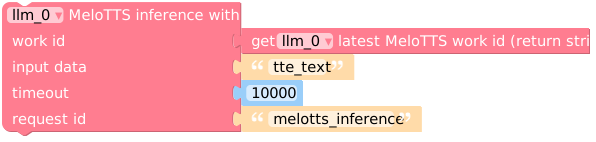
llm_0.melotts_inference(llm_0.get_latest_melotts_work_id(), 'tts_text', 10000, 'melotts_inference')
work_id: The work ID for the TTS module. You need to use llm_0.get_latest_melotts_work_id() to get the latest work ID.
input: The text to be synthesized. You can use any string as the input.
timeout: Wait response timeout, default 10000ms (do not wait response)
request_id: The request ID for the inference. You can use any string as the request ID.
Large Language Model
Yolo block
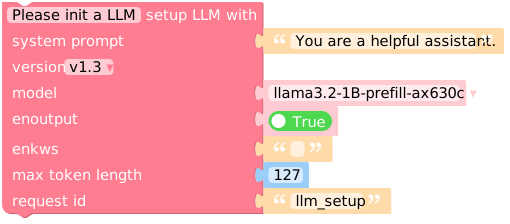
llm_0.llm_setup(prompt='You are a helpful assistant.', model='qwen2.5-0.5B-prefill-20e', enoutput=True, enkws='', max_token_len=127, request_id='llm_setup')
prompt: The system prompt for the LLM. Default is You are a helpful assistant..
model: The model name. You can use qwen2.5-0.5B-prefill-20e for the Qwen2.5 model. see the available models: Reasoning models | Flagship chat models
enoutput: If true, the LLM module will return the response in the response message. Default is true.
enkws: The work ID of the latest KWS module. Default is an empty string.
max_token_len: The maximum token length for the LLM response. Default is 127.
request_id: The request ID for the setup. You can use any string as the request ID.
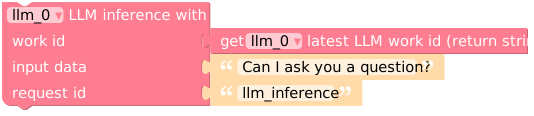
llm_0.llm_inference(llm_0.get_latest_llm_work_id(), 'Can I ask you a question?', 'llm_inference')
work_id: The work ID for the LLM module. You need to use llm_0.get_latest_llm_work_id() to get the latest work ID.
input: The input text for the LLM. You can use any string as the input.
request_id: The request ID for the inference. You can use any string as the request ID.
Vision
Yolo block
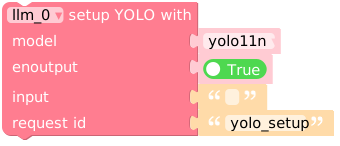
llm_0.yolo_setup(model='yolo11n', enoutput=True, input='', request_id='yolo_setup')
model: The model name for object detection. Default is yolo11n. see the available models: yolo11n.
enoutput: If true, the Yolo module will return the detection results in the response. Default is true.
input: The input format for the Yolo module. Default is an empty string.
request_id: The request ID for the setup. You can use any string as the request ID.
Peripherals
Camera block
Note
To use this module, you need to connect the USB Camera to ModuleLLM
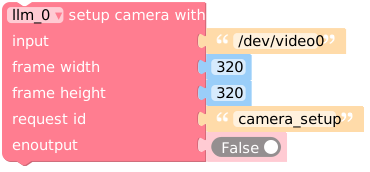
llm_0.camera_setup(input='/dev/video0', frame_width=320, frame_height=320, request_id='camera_setup', enoutput=False)
input: The input device for the camera. Default is /dev/video0.
frame_width: The width of the camera frame. Default is 320.
frame_height: The height of the camera frame. Default is 320.
request_id: The request ID for the camera setup. You can use any string as the request ID.