whisper
This example is for the M5Stack Module LLM. It requires the M5Stack Module LLM to be connected to the M5Stack CoreS3, Core2 or Basic.
The example demonstrates how to use the M5ModuleLLM library to perform keyword spotting (KWS), voice activity detection (VAD), and automatic speech recognition (ASR) using the Whisper model.
Before using, make sure you have the latest software packages installed on ModuleLLM.
Tip
Need help getting started? View the tutorial.
apt install llm-whisper llm-kws llm-vad
English Example
Before using, make sure you have the latest model packages installed on ModuleLLM.
apt install llm-model-whisper-tiny llm-model-silero-vad llm-model-sherpa-onnx-kws-zipformer-gigaspeech-3.3m-2024-01-01
Tip
For more information about this model see the details.
Upload code
Tip
How to use this code View the tutorial.
/*
* SPDX-FileCopyrightText: 2024 M5Stack Technology CO LTD
*
* SPDX-License-Identifier: MIT
*/
#include <Arduino.h>
#include <M5Unified.h>
#include <M5ModuleLLM.h>

M5ModuleLLM module_llm;

/* Must be capitalized */
String wake_up_keyword = "HELLO";
String kws_work_id;
String vad_work_id;
String whisper_work_id;
String language;

void setup()
{
    M5.begin();
    M5.Display.setTextSize(2);
    M5.Display.setTextScroll(true);

    language = "en_US";

    /* Init module serial port */
    int rxd = M5.getPin(m5::pin_name_t::port_c_rxd);
    int txd = M5.getPin(m5::pin_name_t::port_c_txd);
    Serial2.begin(115200, SERIAL_8N1, rxd, txd);

    /* Init module */
    module_llm.begin(&Serial2);

    /* Make sure module is connected */
    M5.Display.printf(">> Check ModuleLLM connection..\n");
    while (1) {
        if (module_llm.checkConnection()) {
            break;
        }
    }

    /* Reset ModuleLLM */
    M5.Display.printf(">> Reset ModuleLLM..\n");
    module_llm.sys.reset();

    /* Setup KWS module and save returned work id */
    M5.Display.printf(">> Setup kws..\n");
    m5_module_llm::ApiKwsSetupConfig_t kws_config;
    kws_config.kws = wake_up_keyword;
    kws_work_id    = module_llm.kws.setup(kws_config, "kws_setup", language);

    /* Setup VAD module and save returned work id */
    M5.Display.printf(">> Setup vad..\n");
    m5_module_llm::ApiVadSetupConfig_t vad_config;
    vad_config.input = {"sys.pcm", kws_work_id};
    vad_work_id      = module_llm.vad.setup(vad_config, "vad_setup");

    /* Setup Whisper module and save returned work id */
    M5.Display.printf(">> Setup whisper..\n");
    m5_module_llm::ApiWhisperSetupConfig_t whisper_config;
    whisper_config.input    = {"sys.pcm", kws_work_id, vad_work_id};
    whisper_config.language = "en";
    whisper_work_id = module_llm.whisper.setup(whisper_config, "whisper_setup");

    M5.Display.printf(">> Setup ok\n>> Say \"%s\" to wakeup\n", wake_up_keyword.c_str());
}

void loop()
{
    /* Update ModuleLLM */
    module_llm.update();

    /* Handle module response messages */
    for (auto& msg : module_llm.msg.responseMsgList) {
        /* If KWS module message */
        if (msg.work_id == kws_work_id) {
            M5.Display.setTextColor(TFT_GREENYELLOW);
            M5.Display.printf(">> Keyword detected\n");
        }

        /* If ASR module message */
        if (msg.work_id == whisper_work_id) {
            /* Check message object type */
            if (msg.object == "asr.utf-8") {
                /* Parse message json and get ASR result */
                JsonDocument doc;
                deserializeJson(doc, msg.raw_msg);
                String asr_result = doc["data"].as<String>();

                M5.Display.setTextColor(TFT_YELLOW);
                M5.Display.printf(">> %s\n", asr_result.c_str());
            }
        }
    }

    /* Clear handled messages */
    module_llm.msg.responseMsgList.clear();
}
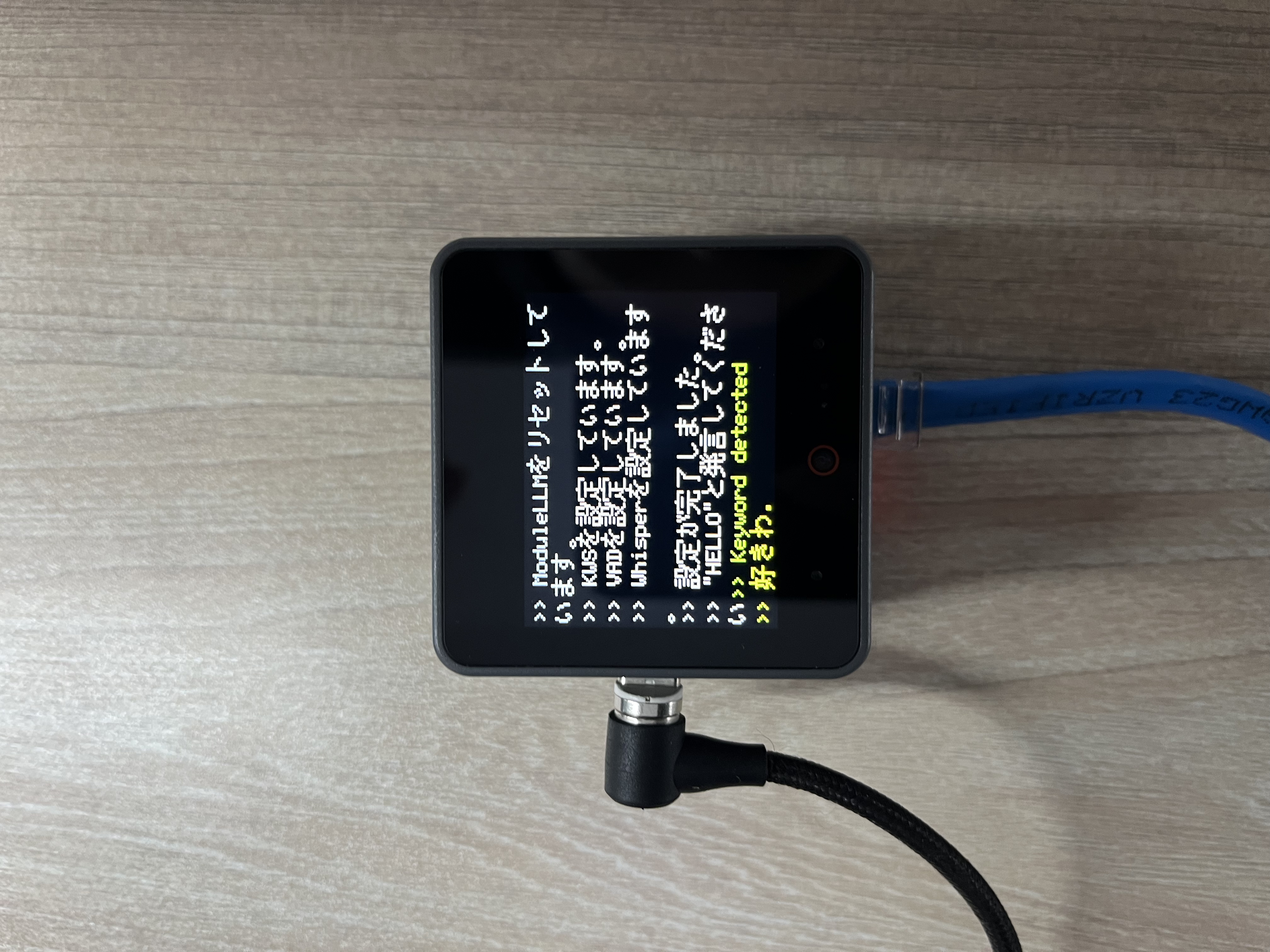
Upload the code to the M5Stack CoreS3 or M5Stack Basic.
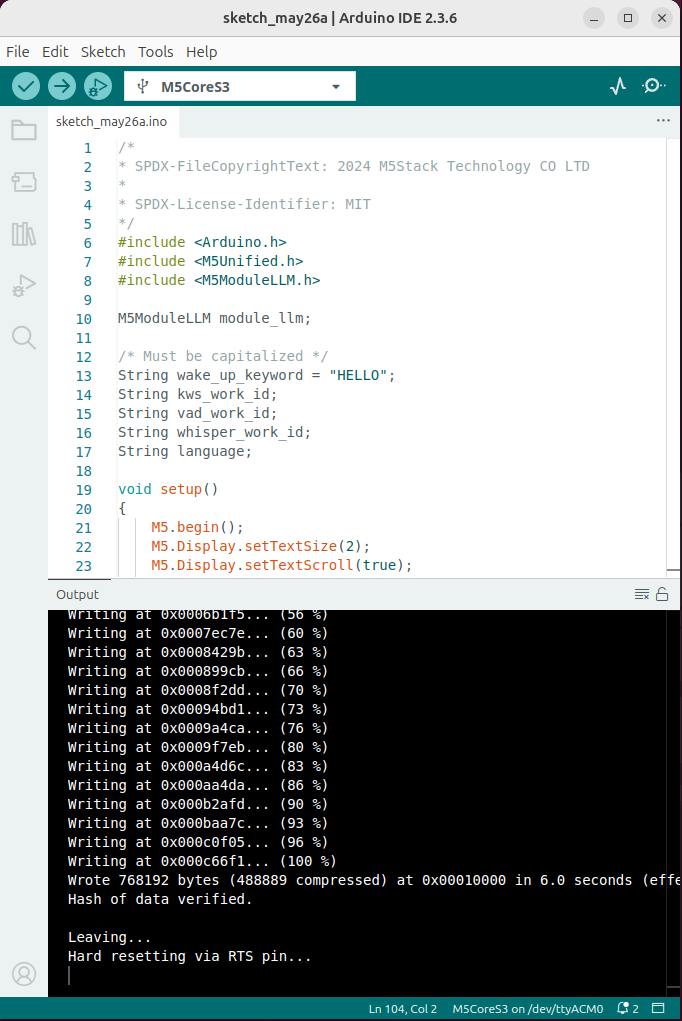
Wait for initialization to complete and display Say “hello” to wakeup

Say “hello” to wake up the voice assistant, It will display keyword detected.

After that, you can say anything you want, and it will display the ASR result.
Japanese Example
Before using, make sure you have the latest model packages installed on ModuleLLM.
apt install llm-model-whisper-tiny llm-model-silero-vad llm-model-sherpa-onnx-kws-zipformer-gigaspeech-3.3m-2024-01-01
Tip
For more information about this model see the details.
Upload code
Tip
How to use this code View the tutorial.
/*
* SPDX-FileCopyrightText: 2024 M5Stack Technology CO LTD
*
* SPDX-License-Identifier: MIT
*/
#include <Arduino.h>
#include <M5Unified.h>
#include <M5ModuleLLM.h>

M5ModuleLLM module_llm;

/* Must be capitalized */
String wake_up_keyword = "HELLO";
String kws_work_id;
String vad_work_id;
String whisper_work_id;
String language;

void setup()
{
    M5.begin();
    M5.Display.setTextSize(2);
    M5.Display.setTextScroll(true);
    M5.Display.setFont(&fonts::efontJA_12);
    language = "en_US";

    /* Init module serial port */
    int rxd = M5.getPin(m5::pin_name_t::port_c_rxd);
    int txd = M5.getPin(m5::pin_name_t::port_c_txd);
    Serial2.begin(115200, SERIAL_8N1, rxd, txd);

    /* Init module */
    module_llm.begin(&Serial2);

    /* Make sure module is connected */
    M5.Display.printf(">> ModuleLLM 接続を確認してください。\n");
    while (1) {
        if (module_llm.checkConnection()) {
            break;
        }
    }

    /* Reset ModuleLLM */
    M5.Display.printf(">> ModuleLLMをリセットしています。\n");
    module_llm.sys.reset();

    /* Setup KWS module and save returned work id */
    M5.Display.printf(">> KWSを設定しています。\n");
    m5_module_llm::ApiKwsSetupConfig_t kws_config;
    kws_config.kws = wake_up_keyword;
    kws_work_id    = module_llm.kws.setup(kws_config, "kws_setup", language);

    /* Setup VAD module and save returned work id */
    M5.Display.printf(">> VADを設定しています。\n");
    m5_module_llm::ApiVadSetupConfig_t vad_config;
    vad_config.input = {"sys.pcm", kws_work_id};
    vad_work_id      = module_llm.vad.setup(vad_config, "vad_setup");

    /* Setup Whisper module and save returned work id */
    M5.Display.printf(">> Whisperを設定しています。\n");
    m5_module_llm::ApiWhisperSetupConfig_t whisper_config;
    whisper_config.input    = {"sys.pcm", kws_work_id, vad_work_id};
    whisper_config.language = "ja";
    whisper_work_id = module_llm.whisper.setup(whisper_config, "whisper_setup");

    M5.Display.printf(">> 設定が完了しました。\n>> \"%s\"と発言してください", wake_up_keyword.c_str());
}

void loop()
{
    /* Update ModuleLLM */
    module_llm.update();

    /* Handle module response messages */
    for (auto& msg : module_llm.msg.responseMsgList) {
        /* If KWS module message */
        if (msg.work_id == kws_work_id) {
            M5.Display.setTextColor(TFT_GREENYELLOW);
            M5.Display.printf(">> Keyword detected\n");
        }

        /* If ASR module message */
        if (msg.work_id == whisper_work_id) {
            /* Check message object type */
            if (msg.object == "asr.utf-8") {
                /* Parse message json and get ASR result */
                JsonDocument doc;
                deserializeJson(doc, msg.raw_msg);
                String asr_result = doc["data"].as<String>();

                M5.Display.setTextColor(TFT_YELLOW);
                M5.Display.printf(">> %s\n", asr_result.c_str());
            }
        }
    }

    /* Clear handled messages */
    module_llm.msg.responseMsgList.clear();
}
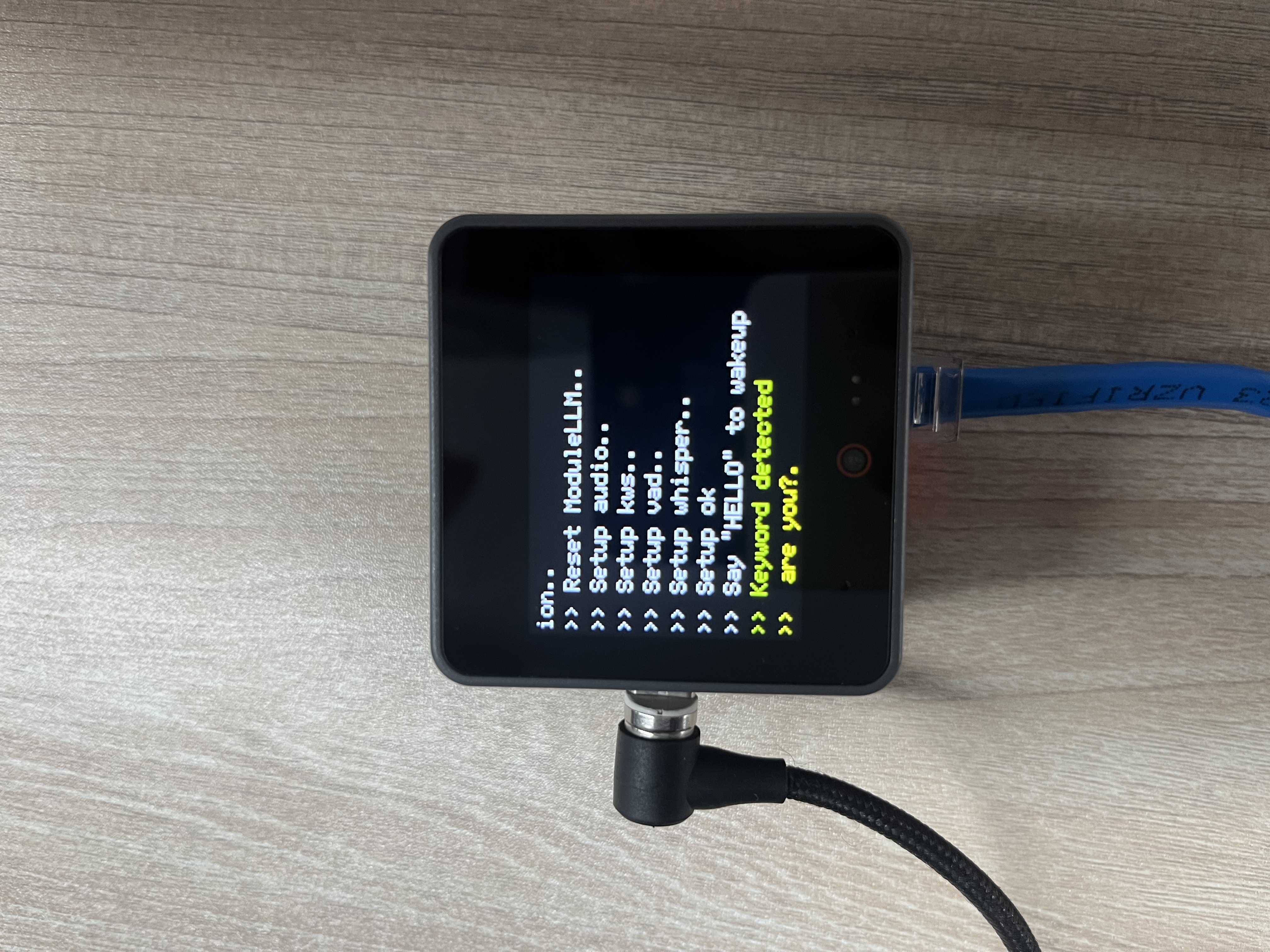
Upload the code to the M5Stack CoreS3 or M5Stack Basic.

Wait for initialization to complete and display Say “hello” to wakeup

Say “hello” to wake up the voice assistant, It will display keyword detected.
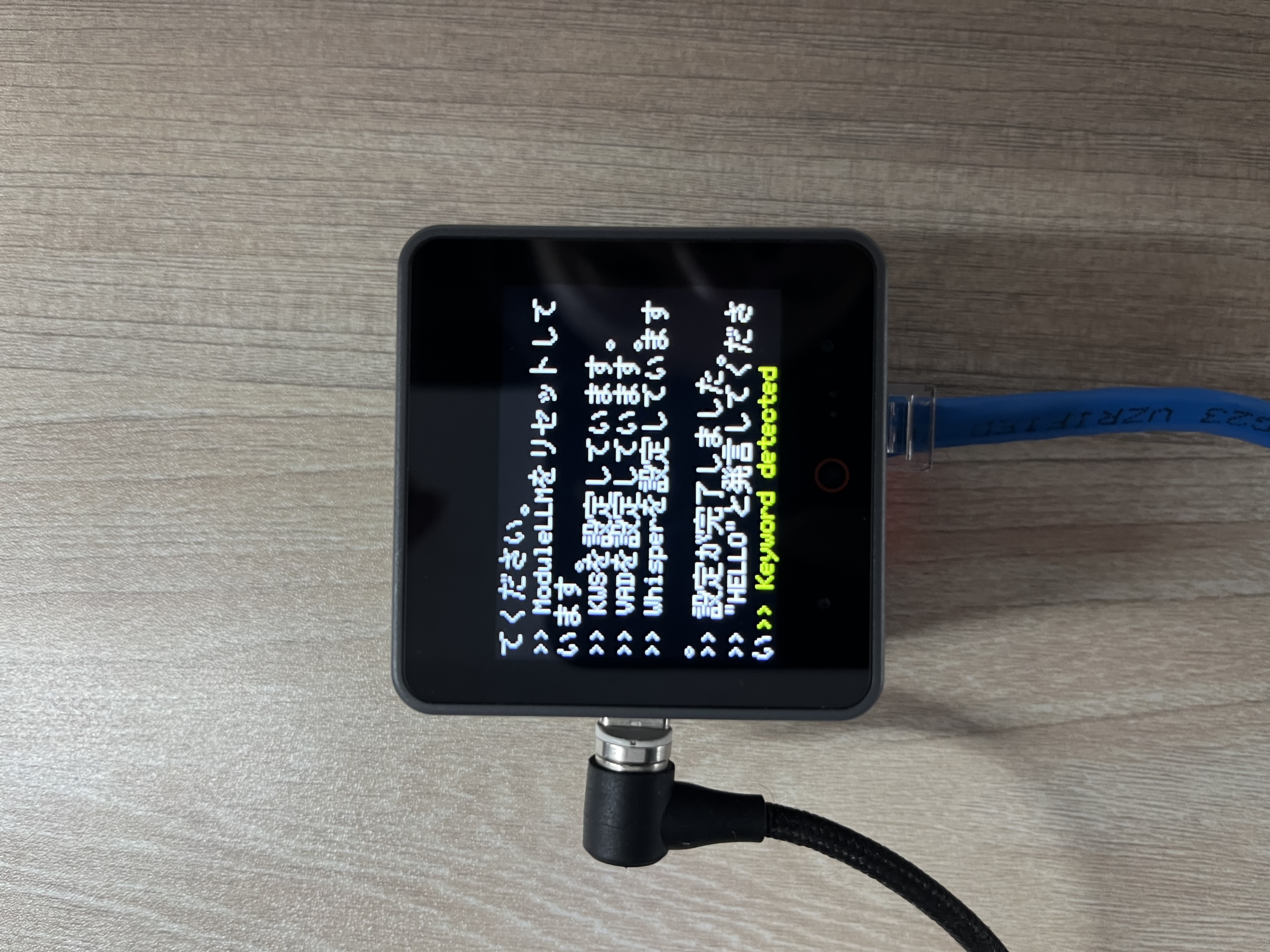
After that, you can say anything you want, and it will display the ASR result.